

Atlassian Data Protection - Challenges in the Cloud
Overview:
As organizations increasingly rely on Atlassian Cloud and Jira as a central source of business-critical information, protecting that data becomes essential. This blog explains the Atlassian shared responsibility model, highlights key gaps in Jira’s native backup and recovery capabilities, and outlines risks such as accidental deletion, bulk changes, configuration errors, malicious activity, retention limitations, and compliance requirements. It also explains why businesses need a dedicated Jira backup and restore strategy and how solutions like Revyz Backup & Restore for Jira can help securely protect, retain, and recover Jira data without requiring a full-site rollback.
The application landscape has changed dramatically as organizations increasingly adopt cloud computing strategies driven by the security, operational and cost benefits cloud technologies provide. Software-as-a-Service (SaaS) applications, in particular, have grown exponentially and are largely replacing traditional enterprise applications and web applications deployed in on-premises data centers.
Two years after COVID’s arrival, we’re settling into the “new normal.” The shift toward remote work in 2020 is now the preference for many people. According to Okta’s Business At Work report 2022 the Atlassian product suite takes the #6 position among the top SaaS applications being used at business behind Office 365, AWS, Google Workspace, Salesforce and Zoom globally. The Atlassian cloud revenues grew over 50%in FY-Q4 '22 in comparison to FY-Q4 '21 also reflecting the adoption of Atlassian’s SaaS offerings.
Yet despite the overwhelming popularity of the Atlassian Product Suite, there’s much confusion about its built-in data protection capabilities. Atlassian backup and restore functionality is often a misunderstood aspect of the Atlassian product Suite. Let’s get started by taking a look at some of the reasons why specifically for Atlassian’s most popular application Jira.
Understanding the Atlassian Shared Responsibility Model
Although enterprise cloud adoption has grown over the years, there’s still a great deal of misconception and confusion about the shared responsibility model. Perhaps surprisingly, many business leaders today still mistakenly believe that moving to the cloud somehow eliminates the need for many core IT functions. A report by the Enterprise Strategy Group (ESG) (The Evolution of Data Protection Cloud Strategies) shows that 35% of the IT leaders surveyed solely rely on the SaaS vendor of the application because they think that the vendor is responsible for protecting our organization’s SaaS-resident application data.
The shared responsibility model defines the cloud provider’s responsibilities and the customer’s responsibilities pertaining to the cloud services offered. For example, in an Infrastructure-as-a-Service (IaaS) offering, the customer is typically responsible for managing the operating systems, applications, and data on any virtual machine (VM) workloads deployed in the cloud, as if they were deployed in the customer’s own data center. The cloud provider is responsible for managing the physical data center and the networking, storage, and compute infrastructure.
Atlassian maintains a shared responsibility model for its product suite. As shown below, Atlassian is responsible for managing the performance and uptime of its applications (Jira, Confluence etc..), and the customer is responsible for the protection and long-term retention of the customer data that is residing with the Atlassian applications (including Jira, Jira Service Management, Confluence etc.. )
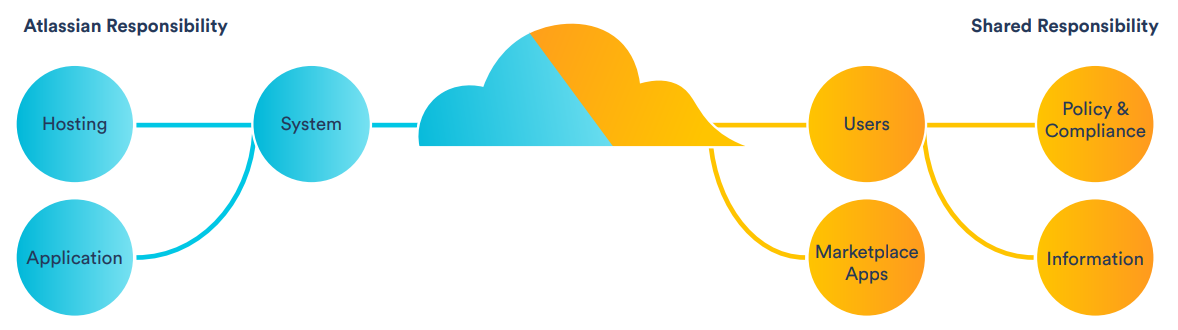
Key shared responsibilities of the Atlassian administrator
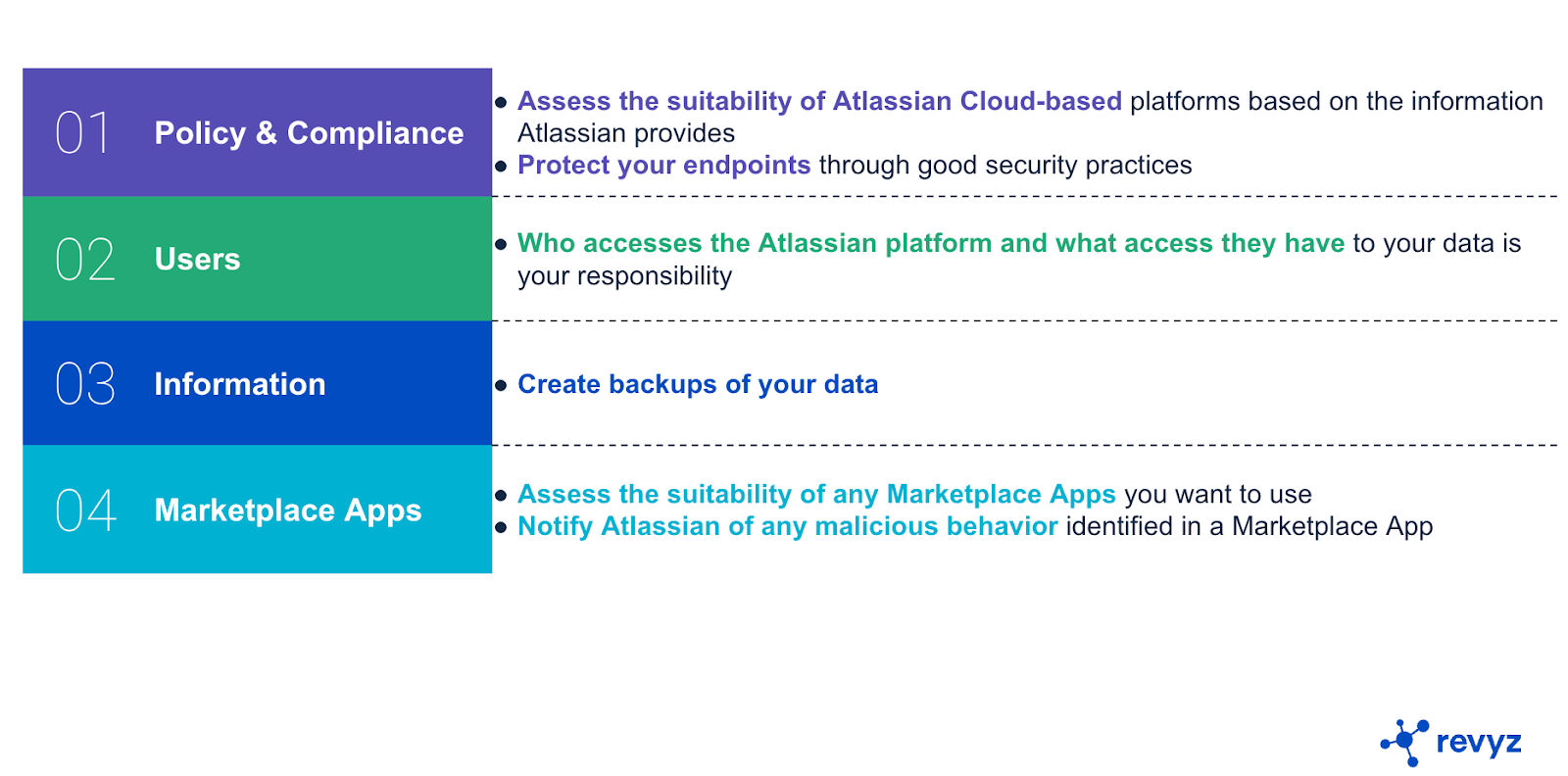
Atlassian Data Protection Gaps
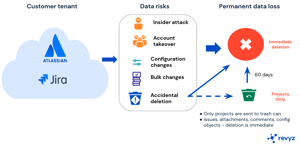
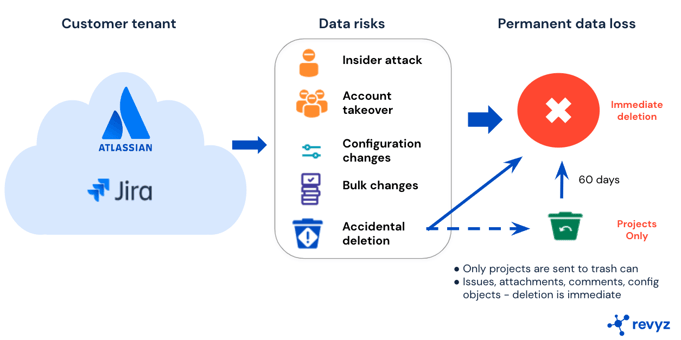
Atlassian’s service-level agreements (SLAs) are primarily designed to protect Atlassian, not you. Its SLAs apply to data Atlassian loses, not that you lose. Recovery capabilities are limited, and expire within 60 days. Atlassian itself says it best as part of its Security Practices: “To avoid data loss, we recommend making regular backups.” The same is also recommended by Atlassian as part of the Shared Responsibilities of a customer using Atlassian Cloud offerings.
Atlassian’s Jira provides some native data protection tools, but they require administrators and users to have knowledge of policies for each application. Relying on these tools places your organization’s data and projects at risk from the following.
- Accidental deletion of data
- Bulk changes made to data, which need to be reverted back
- Configuration changes made to the project configuration
- Malicious data loss caused by employees deleting data
- Malicious data loss caused by employees deleting data threat actors gaining control of your Jira account
- Misunderstanding of the data retention policy gaps within Jira
- Regulatory and compliance related data retention requirements
Why Jira Has Become a Critical Single Source of Truth
Information and data silos limit an organization’s ability to work efficiently. Organizations are now centralizing critical information into the Atlassian product suite of applications including Jira, Confluence as the single source of truth (SSoT), which guarantees that everyone in an organization has the same uniform view of the critical information of an organization, thus reducing organizational confusion and friction and accelerating productivity and efficiency within the organization.
While having all your data accessible to all the relevant stakeholders and providing a uniform view is critical, it also changes the risk profile of the applications holding the data, in this case Jira, Confluence etc.. It is thus critical for organizations to have a clear strategy for protecting this information.
How Revyz Helps Protect and Recover Jira Cloud Data
Implementing a data protection strategy for Atlassian Jira cloud has become a necessity and equally complex. With limited native options from Atlassian, you will have to either build some custom scripts, manage data on your own to address your data protection needs or you leverage 3rd party SaaS applications such as Revyz to offload data protection from your core IT team.
Revyz Backup & Restore app for Jira can store data securely & remotely, making it available for various recovery scenarios without having you to rollback the entire site.
Try Revyz for free - Atlassian marketplace link. Share your feedback on how we can improve & what other use cases you would want Revyz to address.
Frequently Asked Questions
1. Does Atlassian automatically back up Jira Cloud data?
Atlassian maintains its cloud infrastructure and service availability, but customers are responsible for protecting and retaining their own Jira data under the shared responsibility model. Organizations should therefore maintain an independent backup strategy for important Jira data and configurations.
2. Why do organizations need a separate Jira backup solution?
A separate Jira backup solution helps protect against risks such as accidental deletion, bulk changes, configuration errors, malicious activity, retention limitations, and compliance requirements that may not be fully addressed by Jira’s native recovery capabilities.
3. What is the Atlassian shared responsibility model?
The Atlassian shared responsibility model defines which security and data protection responsibilities belong to Atlassian and which belong to the customer. Atlassian is responsible for operating and securing its cloud infrastructure, while customers remain responsible for managing and protecting their own data, users, configurations, and retention requirements.
4. What are the main risks of relying only on Jira’s native backup and recovery features?
Relying only on Jira’s native capabilities can leave organizations exposed to accidental data loss, unwanted bulk changes, project configuration errors, malicious deletion, limited retention options, and challenges meeting regulatory or compliance requirements.
5. How does Revyz Backup & Restore help protect Jira Cloud data?
Revyz Backup & Restore for Jira provides an independent way to securely back up Jira data and configurations and recover affected information when needed. It supports granular recovery scenarios, allowing organizations to restore specific data without having to roll back the entire Jira site.
Blogs from Revyz
7 Reasons Why A Jira Backup & Restore Solution Is A Must Have
Pro's and Con's of using Jira Cloud Database Backup & Restore
Mystery of Incorrect Sprint Reports
Jira - Restoring Issue Family Hierarchy
SaaS Backup: An Antidote to Ransomware
Data Backup - A Key Pillar of Insider Risk Management
What’s your Atlassian Cloud Migration & Data Protection Strategy?
A Guide to SaaS Shared Responsibility Model
Why you need a SaaS backup strategy and solution
Why we built Revyz